

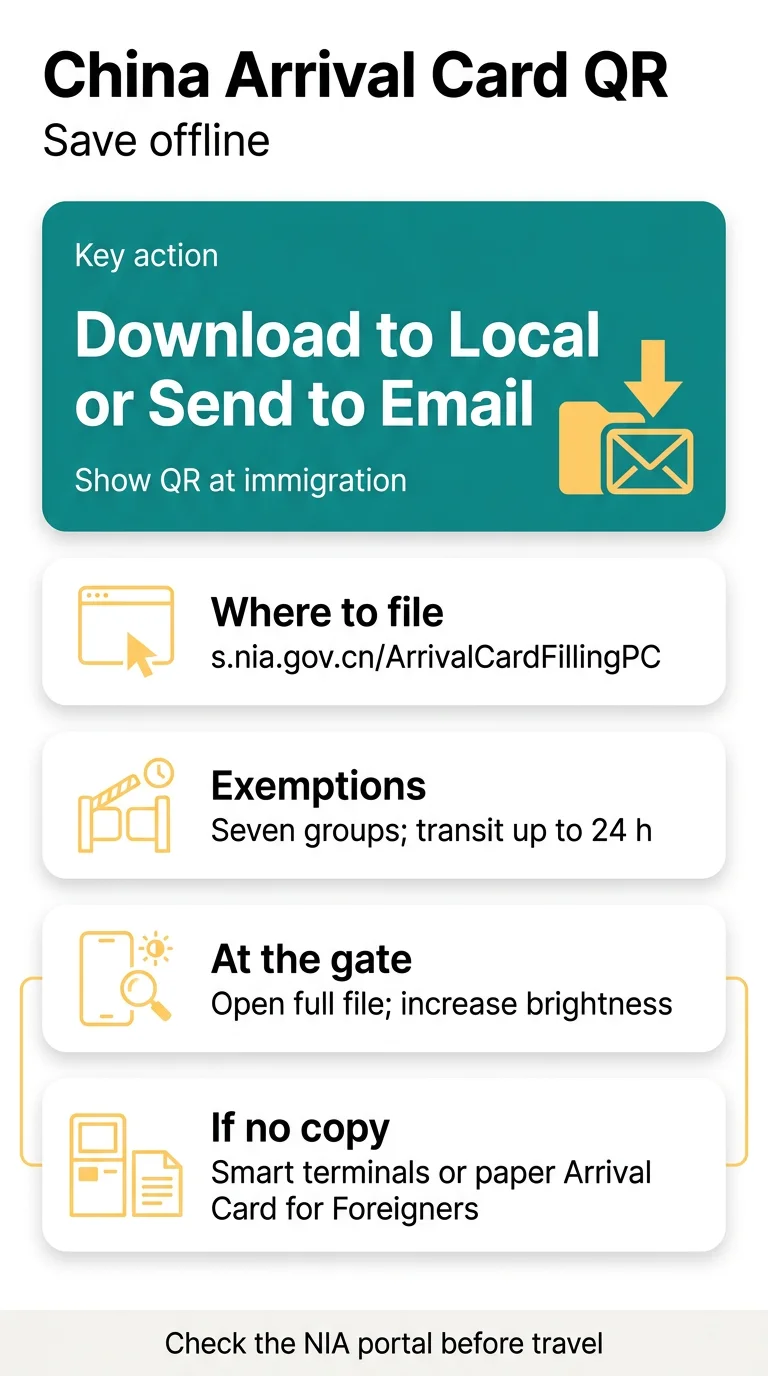
The China Arrival Card QR code (Arrival Card QR) is your digital entry declaration pass at immigration. The card can be downloaded as an electronic file or sent to email. Start at https://s.nia.gov.cn/ArrivalCardFillingPC/.
This is an independent guide, not a government site. Check details on the NIA portal before you fly.
Who Needs a China Arrival Card QR Code
Most foreign visitors show this entry token at immigration unless they’re exempt. For a full breakdown of eligibility and exemptions, see who needs to fill the China Arrival Card. The NIA opened online completion of the Arrival Card on 20 November 2025, and the QR code is shown during immigration checks.
You can file here:
- PC portal: https://s.nia.gov.cn/ArrivalCardFillingPC/
- The “NIA 12367” app
- WeChat and Alipay mini-programs (see our guide to filling in the card via WeChat and Alipay)
The form ends with “Download to Local” or “Send to Email”. If you’re unsure about the timing, check when to fill in the Arrival Card submission windows and deadlines.
Seven groups are exempt from completing the card:
- Foreign Permanent Resident ID Card holders
- Non-Chinese with a Mainland Travel Permit for HK/Macao
- Group visa or visa-free groups
- Direct transit up to 24 h without leaving the port area
- Cruise passengers on the same ship
- Fast-track/e-Channel
- Cross-border vehicle crew
Saving Your China Arrival Card QR Code Offline
The card is delivered electronically, so make sure you have it stored before you land. For a printable alternative, you can also review the China Arrival Card PDF download and field guide.
Save the card
Choose “Download to Local” to save the card as an electronic file, or “Send to Email” to receive it by email.
Store it accessibly
Keep the file somewhere you can open without a connection once you arrive.
Check before boarding
Verify you can open the file and that the QR code is fully visible.
The sources don’t say whether the NIA portal or app exports the card to Apple Wallet or Google Wallet, so we couldn’t confirm it.
| Method | Advantage | Limit |
|---|---|---|
| Downloaded file | Ready to show at immigration checks | Needs a working phone |
| Email copy | Available on any connected device | Requires access to your inbox |
| On-site alternatives | Available at the port of entry | Takes extra time at the border |
Gate Scanning: Brightness, Dark Mode, Screen Protectors
The QR code is scanned on site with a mobile device at the port of entry, so the code needs to be clearly visible on your screen when it’s your turn.
- Open the full file rather than a small preview, so the code reads at a good size.
- Check the display settings on your phone before you join the queue.
- If the code can’t be read, staff can direct you to another way to complete the declaration.
Present your stored file when asked during immigration checks. For what happens after you land, see the steps in the arrival hall, including kiosks and dead-phone backups.
Common Mistakes and Backup Plans
- Not saving the card after submitting: use “Download to Local” or “Send to Email” before you travel.
- Landing without a stored copy: verify you can open the file before departure.
- Assuming you can fill it in later: the online card is meant to be completed before arrival, though on-site options exist.
If you haven’t filled in the card before arriving, you can submit it at the port of entry by scanning the QR code on site with a mobile device, by using the smart service terminals in the inspection area, or by completing a paper Arrival Card for Foreigners — for a comparison, read about the digital Arrival Card vs the paper form.

The paper Arrival Card for Foreigners is also an option. The November 2025 rollout described it as temporary, so check the NIA portal for current rules.
Frequently Asked Questions (FAQ)
How do I save a China Arrival Card QR code offline?
After you complete the form, choose “Download to Local” to save the card as an electronic file, or “Send to Email” to receive it by email. The card includes the QR code that must be shown at immigration checks in China.
Where do I get my China Arrival Card QR code online?
File on the NIA portal at https://s.nia.gov.cn/ArrivalCardFillingPC/ from a computer, or use the NIA 12367 app or the WeChat and Alipay mini-programs.
Can I add the QR code to Apple Wallet or Google Wallet?
The sources don’t say whether the NIA portal or app exports the card to Apple Wallet or Google Wallet, so we couldn’t confirm it. Keep the file you download with “Download to Local” as your copy.
Why won’t my QR code scan at the e-gate?
The card is scanned on site with a mobile device at the port of entry. If the code can’t be read, you can submit the declaration there instead by using the smart service terminals in the inspection area or completing a paper Arrival Card for Foreigners.
Should I turn up the screen brightness?
Set the screen bright enough that the QR code on your saved file reads clearly, and turn off automatic dimming so the display stays steady while you wait.
Do I still need a printed copy?
The paper Arrival Card for Foreigners is available at the port of entry as an alternative to the online card. The November 2025 rollout described it as temporary, so check the NIA portal for the current rules before you rely on it.
What if my phone battery dies before immigration?
If you haven’t filled in the card before arriving, you can submit it at the port of entry by scanning the QR code on site with a mobile device, by using the smart service terminals in the inspection area, or by completing a paper Arrival Card for Foreigners.
Who is exempt from showing the QR code?
Seven groups, listed above. One detail: direct transit counts only up to 24 h without leaving the port area, and cruise passengers need to enter and leave on the same ship. Exempt travelers don’t need a code.
Sources and Further Reading
- Guidelines for Online Completion of the Arrival Card: filing steps and exemptions
Rules may change, so check the NIA portal before you travel.